AI meeting notetakers for workplace conversations
A guide to capture methods, meeting notes and team workflows
Updated Oct 2026
Compare the way each product captures meetings and turns them into usable notes. Products are alphabetical, with documented limits stated in each entry.
How this guide is built
Universe: currently available AI meeting notetaking software for general workplace conversations across multiple conferencing applications. Require a documented capture or transcription route, AI generated summaries and action items, and a current signup, download or sales route. Include standalone assistants and separately identified products within broader software offerings; name the operator or required suite where relevant. Exclude notes confined to a conferencing suite, transcription APIs without a finished meeting workflow, manual note editors, hardware dependent recorders, medical or legal specialist scribes, discontinued products and unavailable private betas. Order by product name ascending. Inclusion describes documented capabilities and does not imply tested quality, privacy certification or a recommendation to record without participant agreement. Snapshot: 5 September 2026.
Compare the workflow
| Product | Capture method | Main workflow |
|---|---|---|
| Avoma | Meeting bot and supported conferencing integrations | CRM and customer conversations |
| Bluedot | Browser, desktop or mobile capture without a meeting bot | Searchable notes and team workflows |
| Calendly Notetaker | Meeting bot | Scheduling linked recaps |
| Circleback | Meeting bot or desktop capture | Action items and workflow routing |
| Fathom | Meeting bot or desktop capture | Shared meeting archive |
| Fellow | Meeting bot or device capture | Team governance and meeting records |
| Fireflies.ai | Meeting bot and device capture routes | Searchable team conversations |
| Grain | Desktop transcription or recording bot | Clips and contextual transcripts |
| Granola | Device audio without a meeting bot | Personal notes enhanced with meeting context |
| Jamie | Device audio without a meeting bot | Notes for online and in person conversations |
| Krisp | Desktop capture with optional meeting bot | Meeting notes alongside audio cleanup |
| MeetGeek | Meeting bot, desktop, mobile or browser capture | Team archive and workflow automation |
| Noota | Meeting bot or device capture | Custom summaries and operational workflows |
| Notion AI Meeting Notes | System audio through the Notion app | Meeting notes within workspace projects |
| Notta | Meeting bot or device capture | Transcription and multilingual notes |
| Otter.ai | Meeting bot or device capture | Live transcripts and shared meeting knowledge |
| Read AI | Supported conferencing capture and device apps | Meeting reports and connected search |
| Sembly AI | Meeting bot and file capture | Meeting notes for professional services |
| Supernormal | Device capture without a meeting bot | Meeting context for agency deliverables |
| Tactiq | Browser transcription without a meeting bot | Text first notes and follow through |
| Talat | Local desktop audio transcription | Local notes with configurable summary processing |
| tl;dv | Meeting recording and desktop capture | Team summaries and workflow integrations |
| Zoom My Notes | Zoom app capture across conferencing platforms | Notes and next steps within Zoom Workplace |
The details below link to current official material. Capture without a bot does not necessarily mean processing stays on the device. Review recording and sharing settings for the intended meetings.
Research and pricing refreshed 14 September 2026.
Products in alphabetical order
 Avoma
Avoma
Avoma sells a meeting assistant alongside scheduling, coaching and revenue tools. Its base assistant includes video recording, live transcription, summary notes and AI follow-up emails. Notes can be saved to CRM records, and the Startup plan also includes dialer integration and individual scheduling. Teams buying the meeting assistant can add conversation and revenue analysis as separately priced products.
Startup costs $19 per recorder seat per month billed annually, supports up to 25 paid seats and includes free view-only seats. Organization supports up to 100 paid seats and adds custom topics and templates, group scheduling, translation, policies, API access and webhooks. The trial runs for 14 days with add-ons enabled.
Conversation Intelligence and Revenue Intelligence each cost an additional $29 per seat per month billed annually. The former adds AI coaching and call scoring; the latter adds deal-risk analysis, sales-methodology tracking and forecasting. Enterprise costs $39 per recorder seat per month annually with a minimum of ten paid seats, and adds retention policies, SSO and team-specific access controls.
 Bluedot
Bluedot captures online and in-person meetings without a meeting bot. Free covers five meetings over the account's lifetime. Basic costs $14 per user per month annually, with unlimited audio meetings, unlimited storage and one hour per recording. Pro costs $20 on annual billing and adds video and unlimited recording duration, plus custom note templates.
 Calendly Notetaker
Calendly's Notetaker records Zoom, Meet and Teams calls, including meetings booked elsewhere, and produces recaps with action items. Standard Plus and Teams Plus include unlimited monthly recaps. It supports English, German, French, Spanish and Portuguese, with transcripts and recaps in the meeting's language.
 Circleback
Circleback creates notes, actions and searchable context from online and in-person meetings. Users can capture online calls with a bot or desktop app, while mobile and Apple Watch apps cover meetings away from a computer. Free includes unlimited meetings with 30 days of history.
Pro costs $15 per user per month on annual billing and adds unlimited meeting history, one year of recording storage and automations across connected apps, including Notion, HubSpot, Salesforce and Attio. Business costs $25 on the same basis and adds unlimited free viewer seats, administrative roles, custom retention and two years of recording storage.
 Fathom
Superhuman acquired Fathom in September 2026. Fathom captures conversations for individuals and teams, with summaries and searchable transcripts plus clips and playlists of important moments. The product covers customer conversations, internal syncs and strategy calls, and lets teams ask questions across past conversations. Its free plan includes unlimited recordings and transcription. Users can choose bot capture or a bot-free option that the pricing page labels a beta for Mac.
Premium costs $16 per user per month billed annually or $20 monthly, adding action items and advanced summaries and a conversational meeting assistant. Team costs $15 annually or $19 monthly per user, with a two-user minimum. It adds global search, shared folders, comments and keyword alerts for colleagues who need to review conversations together.
Business costs $25 per user per month annually or $34 monthly, also with two users minimum. It adds CRM field synchronization, deal views, coaching metrics and AI scorecards. Enterprise is sold through sales and includes custom data retention, SSO and SCIM provisioning.
 Fellow
Fellow combines meeting capture with team recording and sharing policies. It integrates with Zoom, Google Meet and Teams and generates summaries, transcripts and action items. Ask Fellow lets users query meeting content.
Free includes five AI notes and recordings per user over the account's lifetime. Team costs $7 per user per month billed annually or $11 monthly and includes ten monthly AI notes. Business costs $15 annually or $23 monthly, adding unlimited AI notes and recordings, organization-wide templates and Salesforce and HubSpot integrations. Enterprise starts at ten users and adds recording permissions, provisioning and transcript redaction.
 Fireflies.ai
Fireflies captures team conversations through a meeting bot, a desktop app, a Chrome extension or mobile recording. It supports Zoom, Google Meet and Teams, with search and live transcription. Summaries can include action items and custom notes, and AskFred queries meeting content. The service supports transcription in more than 100 languages and has speaker recognition for recordings.
The free plan has limited AI summaries and 400 minutes of team storage. Pro costs $10 per seat per month billed annually and includes unlimited transcription and summaries, video recording, downloads and 8,000 storage minutes per seat. Business costs $19 on annual billing and adds unlimited storage, conversation intelligence and administrative team analytics.
AI credits form a separate allowance: Free and Pro include 20, Business 30 and Enterprise 50, as shown in the plan feature comparison. Enterprise costs $39 per seat per month on annual billing and adds private storage and retention controls, SSO, SCIM and audit logs. Fireflies features AssemblyAI and Emaar among the organizations using the service.
 Grain
Grain
Grain offers bot or desktop capture, live transcripts, AI notes, action items and clips. Its free individual plan allows unlimited meetings up to 45 minutes each, with 30 days of meeting history. Free has no shared workspace.
Pro costs $15 monthly billed yearly or $19 monthly, with four-hour meetings, unlimited history and custom prompts and vocabulary. Business costs $29 per seat per month annually or $39 monthly, with a two-seat minimum. It adds a shared workspace and free viewers, eight-hour meetings, CRM field autofill, conversation intelligence and workspace meeting access through Claude and ChatGPT.
 Granola
Granola captures computer audio and combines it with notes you write yourself to produce meeting notes and actions. It works with Zoom, Google Meet and Teams without adding a bot, and has apps for macOS, Windows, iOS and Android. Shared folders and AI chat across previous meetings are included in its free Basic plan.
The free history window is limited to 30 days. Business costs $14 per user per month and includes unlimited notes and history, centralized billing and integrations with Attio, Notion, HubSpot, Affinity and Zapier. It also adds API access and pre-meeting briefs and follow-ups. Enterprise costs $35 per user per month, with SSO, organization-wide deletion periods and controls over sharing and API access. Individuals can opt out of model training on Basic, while Enterprise adds a team-wide training opt-out.
Granola's named customers include Vanta, Gusto and Asana. The company raised a $125 million Series C in March 2026 at a $1.5 billion valuation, led by Index Ventures, with Kleiner Perkins and existing investors participating.
 Jamie
Jamie
Jamie records audio without a meeting bot across online platforms and in-person conversations. It generates notes and transcripts with task detection and speaker recognition, while Ask Jamie retrieves context from previous meetings. Its site names IK Partners and saas.group among customers.
Free includes ten AI notes monthly, with a 30-minute meeting limit. Pro costs €39 per month billed annually and includes unlimited notes, meetings up to five hours and CRM and task integrations. Team costs €33 per seat per month annually, adding centralized billing, shared templates and a shared workspace with tags.
 Krisp
Krisp
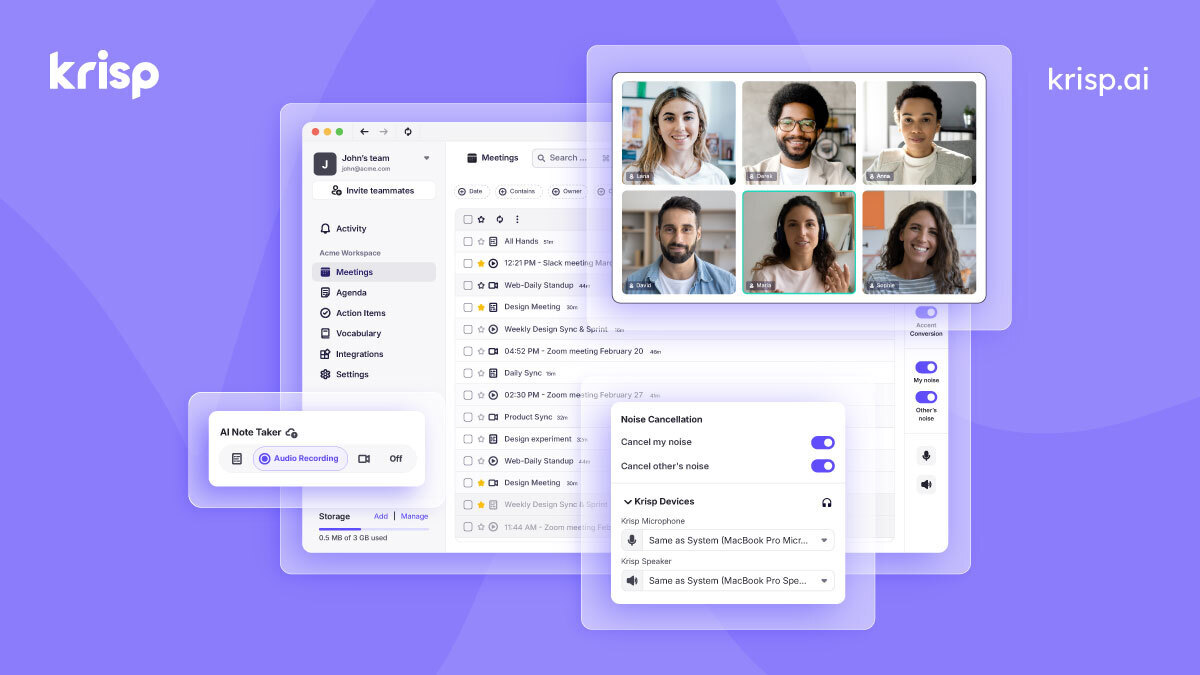
Krisp combines noise cancellation and meeting notes for people who want audio tools alongside transcription. Its meeting assistant includes bot-free capture, audio and video recording, summaries and action items, AI chat and mobile support for in-person meetings.
The free offer is a seven-day trial. Core costs $8 per user per month annually or $16 monthly and includes unlimited notetaking and noise cancellation, with 10 GB of storage. Advanced costs $15 annually or $30 monthly, adding 60 GB of storage, Salesforce and ConnectWise integrations and administrative recording controls. Enterprise adds SSO, SCIM and unlimited storage.
 MeetGeek
MeetGeek offers bot and bot-free recording for Zoom, Google Meet, Teams and other conversations. Desktop, mobile and Chrome applications feed a library with summaries, chat and meeting search. Even Basic includes a summary for each meeting.
Basic provides three transcription hours monthly, three months of transcript storage and one month of audio storage. Pro costs $9.99 per user per month annually or $15.99 monthly, with 20 transcription hours per month, one year of transcripts and six months of audio. Extra transcription costs $0.50 an hour. Business adds HD video and team spaces, unlimited transcription and unlimited transcript storage.
 Noota
Noota
Noota turns conversations into meeting notes and to-do lists. Free offers one month of storage; unlimited recording requires automatic calendar joining and sharing of summaries with participants. Pro adds desktop recording without a bot, CRM connections and six months of storage. Business adds workflows and unlimited storage, company templates and administrative controls.
 Notion AI Meeting Notes
Notion's AI Meeting Notes stores conversations beside the projects and documents they concern. It transcribes and summarizes meetings across video tools, with action items and searchable context. Notion also features a testimonial from Clay's head of engineering about using the notes to turn discussions into drafts.
Access requires Business or Enterprise, or an eligible mobile subscription that includes Notion AI. Business costs $20 per member monthly on annual billing and includes the wider workspace. Desktop use requires version 4.7.0 or later, plus system audio, microphone and screen recording permissions for capture. On Mac, desktop capture requires macOS 13 or later. Browser capture only hears the microphone, so remote participants using headphones require the desktop audio workflow.
The service has a ten-hour daily usage limit per user. Notes inherit the permissions of their Notion page, so a private page needs explicit sharing with teammates. Optional locally stored audio is available only to the recorder for download; workspace owners can also disable meeting notes through their AI settings.
 Notta
Notta
Notta captures meetings through a bot or desktop app, with integrations for Zoom, Google Meet, Teams and Webex. It produces summaries and action items, and offers questions across previous meetings. Desktop capture is available for Mac and Windows.
Free includes 120 minutes monthly, but only three minutes per conversation. Pro costs $97.99 annually, displayed as $8.17 per month, and includes 1,800 transcription minutes monthly, five-hour recordings and 100 monthly AI summaries. Business costs $199.99 per seat annually, displayed as $16.67 monthly, with unlimited transcription, video recording and 200 monthly AI summaries.
 Otter.ai
Otter records workplace conversations and turns them into searchable transcripts and follow-ups. It has desktop, browser and mobile capture, while its meeting integrations cover Zoom, Teams and Google Meet. AI Chat can answer questions within a meeting or across previous conversations, and the service includes live transcription and speaker identification.
Basic provides 300 transcription minutes monthly. Pro costs $16.99 per user on monthly billing, with 1,200 minutes of in-app recording and a 90-minute meeting limit. It also includes ten monthly file imports, unlimited storage and advanced search and export. Shared vocabulary and taggable speakers are included with Pro, alongside advanced meeting templates and integrations with Salesforce, HubSpot and Zapier. Business extends capture to four hours per meeting, allows three concurrent meetings and adds administrative usage information.
For larger deployments, Enterprise includes SSO and SCIM provisioning, custom integrations and a sales notetaker. Otter announced a $320 million growth financing from General Catalyst's Customer Value Fund in October 2026. Its homepage includes a customer testimonial from Aiden Technologies' sales team.
 Read AI
Read AI joins Zoom, Teams and Meet to produce meeting transcripts and reports. It also connects meeting context with email, calendar and CRM information, and routes action items into connected work tools. Ask Read provides answers with citations from shared work content.
Free includes five meeting transcripts per month, search and a personalized meeting coach. Pro costs $15 per user per month annually or $19.75 monthly, adding unlimited transcripts, storage and premium integrations. Audio and video playback require Enterprise at $22.50 annually, or $29.75 on monthly billing; that plan also adds video highlights and a larger file-upload allowance.
 Sembly AI
Sembly combines meeting capture with a workspace for professional services, including client accounts, branding and generated deliverables. Basic includes unlimited capture and transcription in more than 45 languages, with notes, summaries and tasks and basic AI chat.
Basic costs $10 per month billed annually for one user, with 25 clients, 2,500 monthly credits and one year of history. Pro costs $20 per user per month annually for teams up to 40 users. It includes 100 clients, 3,000 credits per user monthly, two years of history and multi-meeting chat and advanced search, plus automations, webhooks and MCP access.
 Supernormal
Supernormal sells meeting notes without a bot within an agency workspace that creates slides, documents and other deliverables. Free includes 15 monthly credits. Team costs $20 monthly per 50 credits; Business costs $40. Credits are shared across the team, and consumption varies with task complexity.
 Tactiq
Tactiq uses a Chrome extension to transcribe without a bot in Google Meet, Zoom and Teams. It turns transcripts into summaries, action items and follow-up drafts through individual AI actions. Transcripts can be searched, shared and exported.
Free includes ten transcripts and five AI credits monthly. The EUR pricing page lists Pro at €6.67 per user per month billed annually, with unlimited transcripts and ten monthly AI credits. Team costs €13.33 on annual billing and adds unlimited AI credits and automatic transcript sharing. One credit covers an AI action such as a summary or a question.
 Talat
Talat
Talat captures calls on Zoom, Teams, Meet and FaceTime, transcribes locally and generates notes with a built-in model or your chosen cloud model. It offers a ten-hour trial without an account, then costs $89 billed yearly or $189 for a lifetime license. Search and export remain available after the trial ends.
 tl;dv
tl;dv
tl;dv captures meetings on Zoom, Meet and Teams and produces notes that teams can customize for different conversations. The free plan includes unlimited video recording and transcription, with AI notes for ten meetings, ten Ask AI queries and storage retention of up to three months.
Pro costs €18 per seat per month billed annually or €29 monthly. It adds unlimited uploads and storage, custom note templates, action assignment and follow-up email drafts. Global transcript search, Zapier integrations and API and webhook access are also included. The company says its euro and dollar prices use the same number.
 Zoom My Notes
Zoom's My Notes captures conversations on Zoom, other meeting platforms and in person. My Notes Basic provides three uses per month. Paid My Notes adds unlimited AI notetaking and automated meeting workflows. Speaker attribution and meeting citations in the Basic feature list apply specifically to Zoom Meetings.